
In 2026, the demand for AI video editor tools has surged as creators seek faster, smarter ways to produce high-quality content. These tools leverage AI to automate tedious editing tasks, enhance visual effects, and streamline workflow, making video production accessible for professionals and beginners alike. From social media clips to cinematic storytelling, AI video editors save time, reduce errors, and allow for more creative experimentation.
This guide covers the five best AI video editor tools, analyzing their advantages, user experience, and potential limitations, with practical tips for each tool.
1. Pollo AI – Best for Instant Transformation
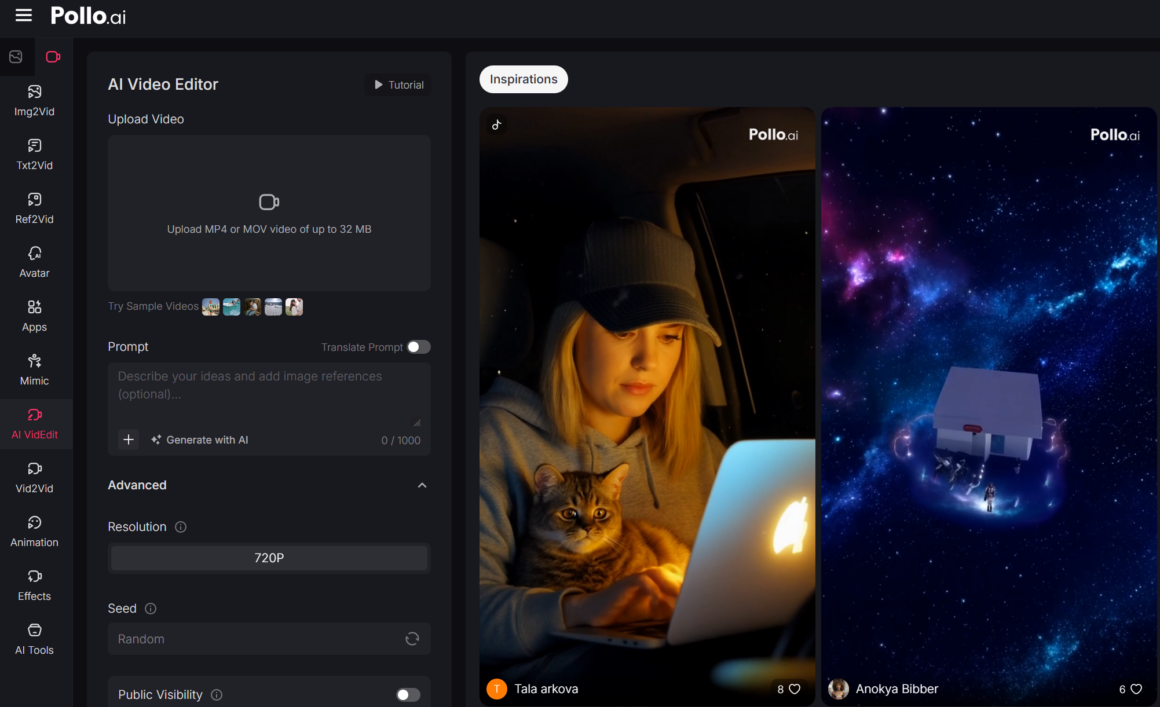
Pollo AI is a cutting-edge AI video editor that transforms hours of traditional editing into seconds. Users can upload a video or images and describe changes with simple text prompts — from altering weather, time of day, or camera angles to erasing objects and applying artistic styles like anime or cyberpunk. The platform supports seamless modifications of subjects’ appearance, outfits, and scene backgrounds. Its all-in-one approach removes the need for multiple tools, making complex edits accessible even to beginners.
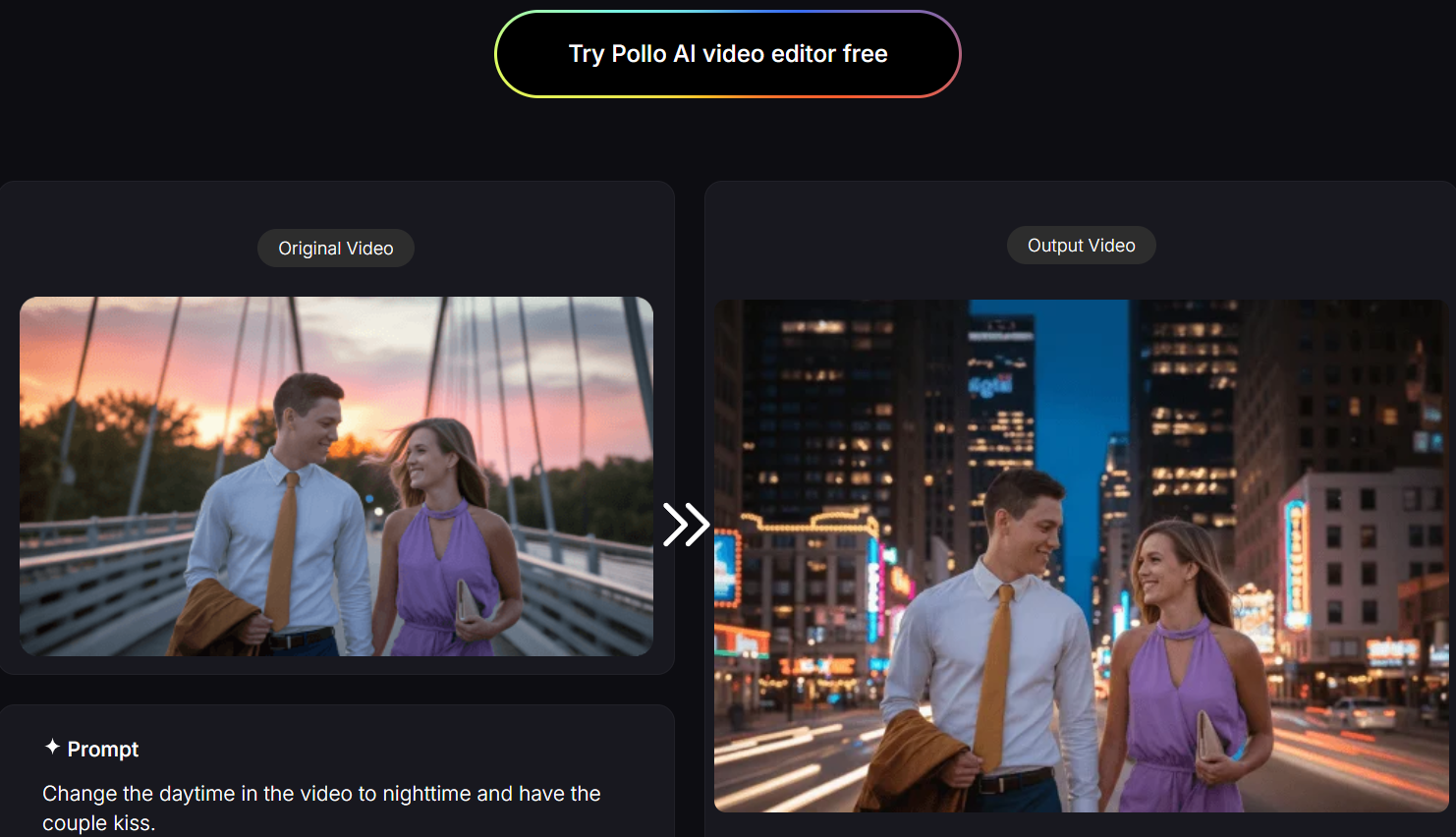
Advantages & Experience: Pollo AI stands out for its instant transformation capabilities. Users can change daytime to nighttime, add visual effects like rain or sparks, and modify camera angles automatically. Editing is intuitive: just upload your video, type a prompt, and generate a polished clip in seconds. In addition, Pollo AI provides excellent functionality for creators looking to make viral meme videos, letting them quickly produce humorous or engaging clips ready for social media sharing.
Potential Limitations: While Pollo AI is incredibly fast, extremely complex scenes may sometimes require multiple iterations to achieve the desired look. The platform relies heavily on the clarity of your prompts, so ambiguous instructions may lead to unexpected results.
Why Recommend Pollo AI
Pollo AI offers unmatched speed and creative flexibility. Its combination of text-prompt-based edits and multiple AI models allows creators to produce professional-level videos without hours of manual work. It is especially effective for short-form content, social media, make viral meme videos, and projects requiring consistent character identity.
My Tip
To get the best results, provide specific and detailed prompts. For example, instead of saying “make it rainy,” use “change the scene to rainy with soft evening lighting and reflections on the ground.” This ensures Pollo AI captures the exact mood and style you want.
2. Runway – Best for Creative Automation
Runway is a versatile AI video editor offering automation for complex editing tasks. It provides features like background removal, scene segmentation, and object tracking, making it suitable for professional content creators and marketing teams. Its collaborative environment allows multiple users to edit simultaneously, streamlining team workflows.
Advantages & Experience: Runway saves time on repetitive tasks with AI-assisted tools for masking, rotoscoping, and motion tracking. Users benefit from precise frame-by-frame editing while maintaining overall efficiency. Its intuitive interface makes it approachable for those with intermediate editing skills.
Potential Limitations: High-end features may require a learning curve for beginners. Certain automated effects may need fine-tuning to achieve perfect results.
Why Recommend Runway
Runway’s AI tools are ideal for creators needing both automation and precision. Its strength in collaboration and complex scene manipulation makes it a great option for team projects and detailed storytelling.
My Tip
Combine Runway’s automated effects with manual adjustments for best results. Start with AI segmentation, then refine key frames to ensure smooth, natural transitions.
3. InVideo – Best for Marketing and Social Media
InVideo is a user-friendly AI video editor designed for marketers and social media creators. With its extensive library of templates, stock footage, and automated voiceovers, InVideo enables quick video production. AI assists with scene arrangement, transitions, and text placement, accelerating the editing process without sacrificing customization.
Advantages & Experience: Users can turn blog posts, product announcements, or ad copy into compelling videos within minutes. Its AI-suggested layouts ensure that even beginners create professional-looking content efficiently.
Potential Limitations: While InVideo excels in speed, creative flexibility is somewhat limited compared to full-featured editors. Complex, cinematic edits may require additional software.
Why Recommend InVideo
InVideo is best for rapid content creation where marketing speed matters. It simplifies the process of producing polished videos for Instagram, YouTube, and Facebook.
My Tip
Leverage the AI templates but customize text, colors, and transitions to maintain brand consistency and avoid generic-looking videos.
4. Canva – Best for Simplified Design Tools
Canva’s AI video editor builds on its reputation for design simplicity. Users can assemble clips, add animated text, overlays, and effects, while AI helps optimize scene timing and visual consistency. Its cloud-based interface allows easy collaboration across devices.
Advantages & Experience: Canva is highly accessible, letting users with minimal editing experience produce visually appealing videos. AI tools handle cropping, color correction, and automatic scene detection, reducing the need for manual adjustments.
Potential Limitations: Canva is less suitable for highly complex video projects. Professional editors may find its capabilities limited for cinematic production or multi-layered effects.
Why Recommend Canva
Canva is recommended for social media marketers, educators, and small teams who prioritize speed and ease of use. Its AI video editor balances simplicity with polished results.
My Tip
Use Canva’s AI suggestions as a starting point, then tweak elements like text timing and overlay effects to match your creative vision.
5. Adobe Premiere Pro – Best for Professional Production
Adobe Premiere Pro integrates AI-powered features via Adobe Sensei, offering tools like automated scene editing, color correction, and audio cleanup. Its AI video editor capabilities allow for highly precise adjustments, supporting a wide range of video formats and resolutions.
Advantages & Experience: Premiere Pro is favored by professionals for its depth, flexibility, and advanced AI enhancements. It can stabilize footage, generate captions, and optimize audio automatically, significantly reducing post-production effort.
Potential Limitations: The platform has a steep learning curve and may be overwhelming for beginners. Its AI functions assist but do not fully automate the editing process, requiring user expertise.
Why Recommend Adobe Premiere Pro
Premiere Pro is ideal for filmmakers, advertisers, and serious content creators who need professional-grade AI tools combined with full creative control.
My Tip
Use AI-assisted features to handle repetitive tasks like color matching and scene edits, then manually refine transitions and effects for polished results.
Conclusion
Choosing the right AI video editor depends on workflow, skill level, and creative goals. Pollo AI leads for rapid, highly customizable edits with text-prompt-based controls, perfect for short-form social media content and make viral meme videos. Runway excels in collaborative, AI-assisted precision editing. InVideo is ideal for fast marketing content, Canva for simplified design-driven videos, and Adobe Premiere Pro for professional-grade production. Understanding each tool’s strengths, experience, and limitations helps creators maximize efficiency and output quality.